What each finding means
Every check Conduit TEM runs on a posted bill, what sets it off, why it matters and what to do about it.
In the app:Anomalies
On this page
Every time a bill is posted, Conduit TEM checks it line by line against the account's earlier bills, your inventory, your contracts and your carrier orders. Anything that looks wrong, new, duplicated or wasteful becomes a finding.
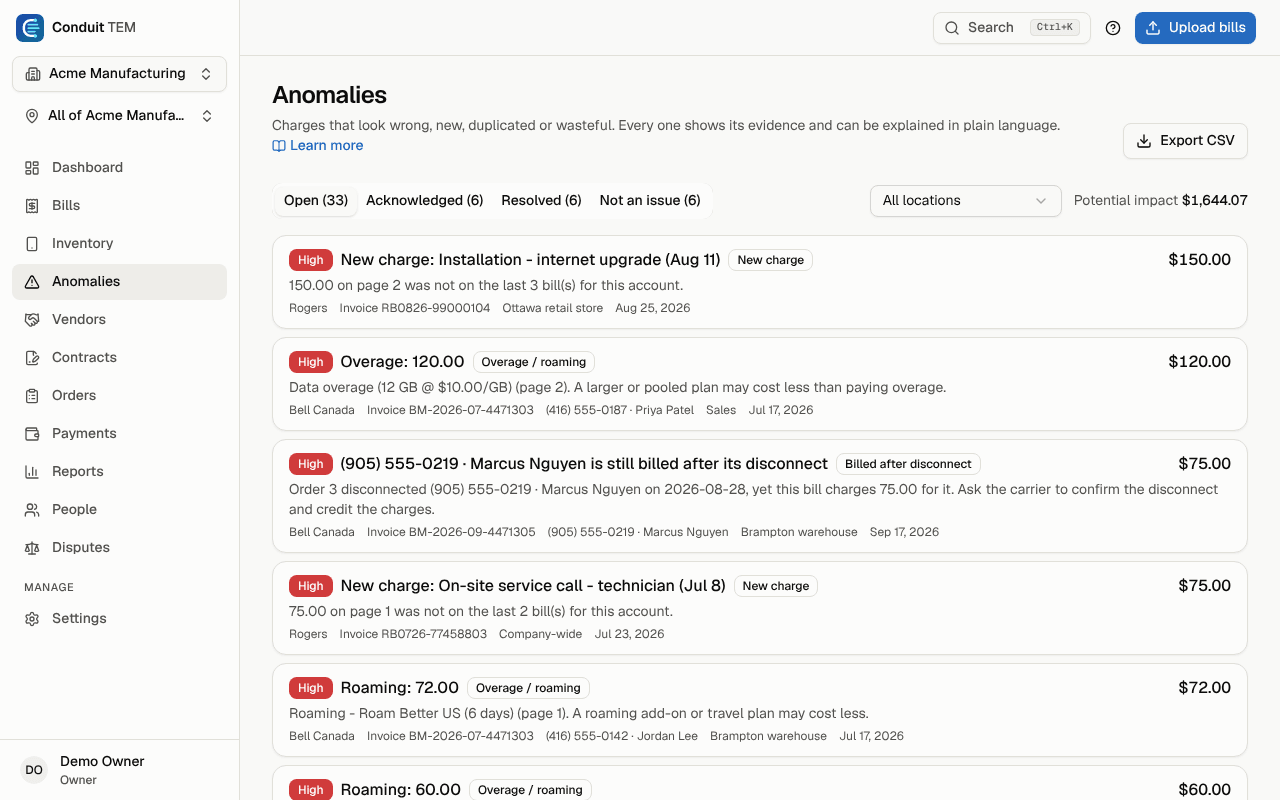
The sidebar calls this page Anomalies, and the two words mean the same thing: an anomaly is one finding. Each one names the check that raised it (the grey label, such as Cost spike), shows the evidence, and estimates how much money is involved.
When the checks run
- The checks run when a bill is posted, not while it is waiting for review.
- History you imported (past monthly totals) is never checked itself. It does give the Cost spike check something to compare against, so your first real bill can be compared from day one.
- Most checks compare a bill with earlier bills on the same account. Your first bill on an account raises fewer findings. From the second or third bill on, you get the full set.
- If the same thing is flagged again for the same bill, Conduit TEM adds to the finding you already have and shows seen 2× instead of creating a second one.
Severity
| Severity | What it means |
|---|---|
| High | Probably money you are owed or about to lose: a duplicate, an outside company billing you, or a large unexpected charge. Look at these first. |
| Medium | Worth checking this month: a fee, a price change, a line that costs more than usual. |
| Low | Housekeeping: a line that wasn't billed, an add-on nobody seems to use. Often a chance to save rather than an error. |
The list puts the highest severity first, then the largest amount. Estimated impact is a guide, not a promise. For a duplicate it's the extra copy. For an unused line it's what the line costs each month.
Tip: You can get an email when a posted bill raises high-severity findings. Turn on Findings after a bill is posted under Settings → Profile & security. It sends at most one email per bill.
Spending changes
Cost spike
What sets it off: a bill well above what the account usually costs. Conduit TEM takes the middle value of the last three bills and flags the new bill when it is at least 25% higher and at least $100 more. It also checks each line or service. A line's charges (before tax) that are at least 20% and $10 above its usual amount get their own finding. A bill 50% above usual, or a line that has doubled, is high severity.
Why it matters: a spike usually has one cause, such as roaming on a trip, a new plan, or a billing mistake. It's easiest to find while the bill is fresh.
What to do: open the finding and select Explain with Conduit AI, or open the invoice and compare it with last month. If the reason is genuine (an expansion, a trade show), mark it Acknowledged with a note.
New charge
What sets it off: a charge over $5 whose description hasn't appeared on the account's last three bills. Numbers in the description, such as dates, are ignored. Charges of $50 or more are high severity. Taxes are skipped.
Why it matters: new charges are how unwanted extras creep in, like a service fee or a feature nobody asked for.
What to do: check who ordered it. If it was quoted, confirm the price matches. If nobody knows what it is, dispute it.
Plan price change
What sets it off: a monthly charge for the same line and description that moved by at least 3% and at least $1 compared with the previous bill. An increase is medium severity. A decrease is low.
Why it matters: carriers raise prices or end promotions without much warning, and business agreements often lock prices.
What to do: for an increase, check your contract or the carrier's notice. For a decrease, confirm that a discount didn't end early or a plan wasn't changed by mistake.
Overage / roaming
What sets it off: a usage charge described as roaming, international or long distance, or overage (extra data, additional minutes). Charges of $50 or more are high severity.
Why it matters: a travel pass, a bigger or pooled plan, or a calling add-on almost always costs less than paying per use.
What to do: if it will happen again, change the plan or add the right add-on. If the line already has an add-on that should cover it, ask the carrier why it didn't.
Billing errors
Duplicate charge
What sets it off: the same charge, with the same number, description and amount, appearing two or more times on one bill. Always high severity. The impact is the extra copies.
Why it matters: this is one of the most common carrier errors, often after an equipment swap or plan change.
What to do: check the pages the finding lists, then select Dispute with vendor and ask for the extra charge to be reversed.
Duplicate invoice
What sets it off: a bill with a different invoice number but the same billing period and the same total as a bill you already posted on that account. Always high severity.
Why it matters: paying the same bill twice is easy when a carrier reissues a statement.
What to do: compare the two bills. If one is a reissue, void the one you don't need so it isn't paid twice.
Late fee
What sets it off: any late payment fee on the bill.
Why it matters: late fees are pure cost, and carriers often waive them if you ask.
What to do: if you paid on time, ask the carrier to remove it. If you paid late, set up automatic payment for that account.
One-time charge
What sets it off: a one-time charge of $50 or more, such as activation, installation or a device fee.
Why it matters: one-time charges are often quoted at one price and billed at another, or waived in your agreement.
What to do: match it to an order or quote. If your agreement waives it, dispute it.
Third-party charge
What sets it off: any charge the carrier bills for another company, such as premium text messages or subscriptions. Always high severity, whatever the amount.
Why it matters: these charges (sometimes called cramming) are often unauthorized. Carriers can usually refund them and block them for the future.
What to do: ask the person who uses the line. If they didn't sign up, dispute it and ask the carrier to block third-party billing on the account.
Inventory and usage
Zero usage
What sets it off: a mobile line or landline you paid a monthly charge for that had no calls, texts or data this period. It only fires when the bill includes usage detail for that line. It's low severity, or medium if the line was also unused on the previous bill.
Why it matters: an idle line is the easiest saving there is.
What to do: find out who has it. Suspend, cancel or reassign it. If it's a backup or seasonal line you mean to keep, choose Don't flag this again.
Unused add-on
What sets it off: a roaming, long-distance or international, or texting add-on that costs at least $1 a month on a line that used none of that service this period. It only fires when the bill has usage detail for the line. It's medium severity from $15 a month, otherwise low.
Why it matters: add-ons get bought for one trip and then stay on the bill.
What to do: if the add-on stays unused for a few bills, remove it. If it's kept on purpose (for example, for calls that happen a few times a year), choose Don't flag this again.
Billed but not in inventory
What sets it off: a line or service that appears on an account for the first time, after that account already had posted bills. It's medium severity when its monthly charges are $50 or more, otherwise low.
Why it matters: a new line nobody can account for may be a mistake by the carrier, or a line nobody is responsible for.
What to do: confirm it was ordered and assign it to the person who uses it. If you raised a carrier order for it, the order closes this finding by itself once the bill confirms it.
In inventory but not billed
What sets it off: a line that is active in your inventory but has no charges on this bill. Low severity, with no dollar impact.
Why it matters: the line may have been cancelled, moved to another account, or missed by the carrier, which could mean a catch-up charge later.
What to do: if it was cancelled, mark it disconnected in Inventory. If it moved, check the other account's bill. A verified disconnect order closes this finding by itself.
Suspended line still billed
What sets it off: a line marked suspended in your inventory that still has charges, or a line marked disconnected that shows up on a bill again. Medium severity.
Why it matters: a suspended line should cost little or nothing, and a disconnected one nothing at all.
What to do: ask the carrier to confirm the suspension or disconnection and credit the charges.
High data use, high roaming spend and high overage on a bill
What sets it off: a bill crossing one of your organization's high-usage levels: data on one line (20 GB by default), roaming on one line ($50 by default), or overage and pay-per-use charges on the whole bill ($50 by default). Owners and admins change the levels or turn them off in Settings → Organization. Medium severity; high at double the data level or three times the roaming and overage levels.
Why it matters: heavy users and travellers usually cost less on a bigger plan, a shared pool or a travel pass.
What to do: talk to your account manager, and ask for a travel pass before the next trip. Members who turn on high-usage alerts get an email for each bill. See High-usage alerts.
Contracts and orders
Above contract rate
What sets it off: a bill line charged more than the rate in an active contract that covers the account. Small rounding differences (half a percent, or one cent) are allowed. A difference of $20 or more is high severity. The same check also reminds you, once per contract, when a contract that doesn't renew automatically has ended but the account is still being billed.
Why it matters: this is money the carrier agreed not to charge.
What to do: dispute the difference. The full story is in The contract rate check. This check is part of the paid plans.
Billed after disconnect
What sets it off: a service with a completed disconnect order that is still charged monthly or usage fees (after any credits) on a bill whose period starts after the disconnect date. Charges of $50 or more are high severity. Final-bill items such as an early-termination fee or device payout don't count.
Why it matters: carriers sometimes keep billing a line after confirming it was cancelled.
What to do: ask the carrier to stop billing and credit the charges, then dispute the amount. See Carrier orders.