The contract rate check
How each bill line is matched to a contracted rate, what raises an Above contract rate finding, and what to do when one appears.
On this page
When a contract lists its rates, Conduit TEM checks every posted bill on the contract's accounts line by line. Any line charged more than the agreed rate becomes an Above contract rate finding, ready to dispute.
The contract rate check is part of the paid plans.
What it needs
- A contract with Status set to Active.
- The vendor accounts it covers, ticked under Accounts it covers. Only bills on those accounts are checked.
- Its rates, entered under Contracted rates. See Keep track of your carrier contracts.
The check runs every time a bill on one of those accounts is posted. After you add or fix rates, select Check recent bills on the contract page. It re-checks the last three posted bills on each covered account.
How a bill line is matched to a rate
For each charge on the bill, Conduit TEM looks for the rate that fits it:
- The words match. Every word in the rate's Bill lines containing appears in the line's description. Capitals and punctuation don't matter, and the order of the words doesn't either.
- The service type agrees. If the rate names a Service type, a line on a different type of service doesn't match.
- The rate is in effect. The bill's period start (or its date) falls inside the rate's From and To dates, if it has them.
- The most specific rate wins. If several rates match, the one with the most words is used.
Taxes, credits, late fees and charges billed for other companies are never matched to a rate.
How the billed rate is compared
Conduit TEM works out what you were actually charged, in the same unit as the contract:
- per month: the line's amount.
- per line / month and per unit: the unit price printed on the bill, or the amount divided by the quantity.
Carriers round and prorate, so a difference of up to half a percent (or one cent, whichever is larger) counts as a match.
Each checked line gets one of three results, listed under Bill lines checked on the contract page:
| Result | Meaning |
|---|---|
| Matches | Billed at the contracted rate. |
| Under | Billed below it. Usually a promotion or a credit. Nothing to do. |
| $X over | Billed above it. This raises an Above contract rate finding. |
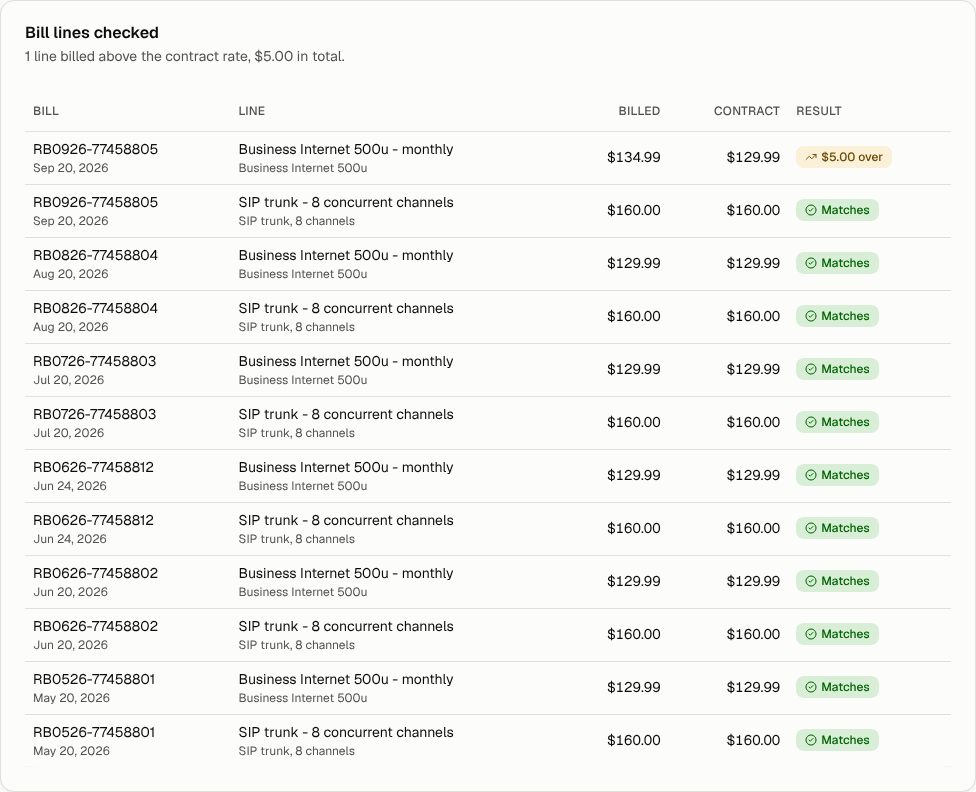
The Above contract rate finding
The finding names the rate and the contract, the billed and contracted prices, and the quantity. Its impact is the difference times the quantity. For example, 10 lines billed $3 over is $30. An overcharge of $20 or more on one line is high severity, anything less is medium.
You'll find these findings:
- on the Anomalies page, labelled Above contract rate
- on the contract page, under Open findings
- in the Overcharged column of the Contracts list, and the Billed above contract rates tile
What to do when it fires
- Check the match. On the contract page, look at Bill lines checked. Make sure the line really falls under that rate. The rate's name is shown under each line's description.
- If the wrong rate matched, make the rate's Bill lines containing words more specific, or set its Service type. Then select Check recent bills.
- If the price really changed, check whether an amendment set a new rate from a certain date. If so, add that rate with its From date.
- If it's a genuine overcharge, open the finding and select Dispute with vendor. The credit expected starts at the overcharge. When the credit shows up on a later bill, the dispute closes by itself. See Disputes and credits.
Tip: If the same overcharge repeats every month, raise it with the carrier once, quoting the contract, and ask them to fix the rate going forward as well as crediting past bills.
Billed after a contract ended
The same check also watches the calendar. When an active contract's end date has passed, it doesn't renew automatically, and its accounts are still being billed, you get one Billed after contract ended finding for that contract. It has no dollar amount, because nothing is overcharged yet. It's a reminder that the agreed rates are no longer guaranteed. Renew or renegotiate before prices change, or set the contract's Status to Ended if it's over.