Upgrades and renewals
See which lines can take a new device, which contracts end soon and which lines nobody uses, each with what to talk about, then export it or add it to a business review deck.
In the app:Upgrades & renewals
On this page
Accounts → Upgrades & renewals gathers the conversations worth having about your carrier accounts on one page:
- Upgrade eligibility: which mobile lines can take a new device now, which can within 90 days, and which later.
- Contracts coming up: agreements and line terms ending within 90, 180 or 365 days, by account.
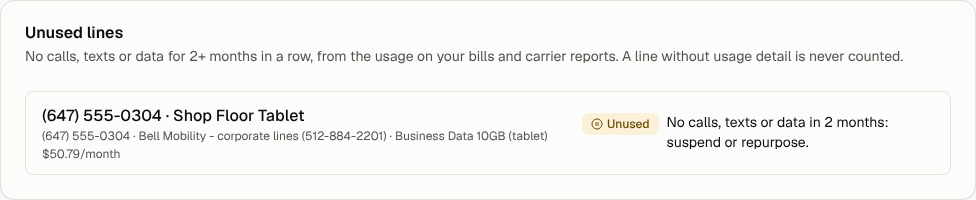
- Unused lines: lines with no calls, texts or data for one, two, three or six months in a row.
Every line comes with a recommendation in plain words, such as "suspend or repurpose", "upgrade eligible: discuss a new device" or "contract ends in 60 days: renewal conversation".
When you want to act on one, ask for it through Orders or talk to your account manager (see Your account manager); quotes and proposals are prepared by your Conduit account team.

Where the figures come from
| On the page | Comes from |
|---|---|
| Upgrade dates, device balance, months left on the term, line contract end | The carrier's user list. For Bell, import the detailed users list under Settings → Import data (Import Bell portal exports). |
| Agreements ending | Your contracts and the accounts each one covers. |
| Unused lines | Usage printed on your bills, and the carrier's usage report when you import it. |
A line without usage detail is never counted as unused: not knowing is not the same as not using.
Read the page
- Go to Accounts in the side menu. Upgrades & renewals opens first.
- Under Contracts ending within, pick 90 days, 180 days or 365 days.
- Under Unused for at least, pick how many months in a row a line must sit idle: 1 mo, 2 mo (the default), 3 mo or 6 mo.
- The tiles at the top count lines that can upgrade now, contracts ending, unused lines (with what they cost a month) and lines that can upgrade soon.
- Select a line's name to open it in Inventory.
Each recommendation carries an icon and a word, so it reads the same without colour:
| Badge | Means |
|---|---|
| Unused | No calls, texts or data for the months you picked: suspend the line or give it to someone who needs one. An unused line is never suggested for an upgrade. |
| Renewal | The line's term, or the agreement, ends within 90 days or has already ended: time for the renewal conversation. |
| Upgrade | The line can take a new device now; the device balance left is shown when there is one. |
| Upgrade soon | Eligible within 90 days: plan the device conversation. |
Export to CSV
Select Export CSV. The file lists every line with something to talk about, with the raw dates and figures behind each recommendation: upgrade date, device balance, months left, contract end, months unused, monthly cost. It follows the windows you picked and only includes what you can see.
Add it to a business review deck
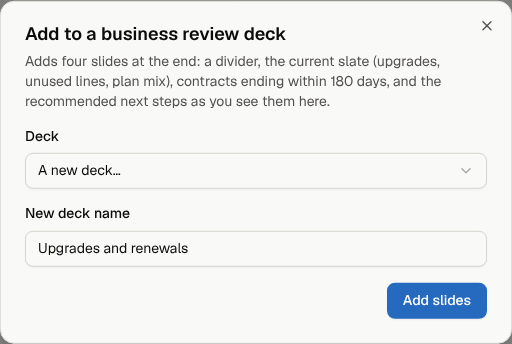
- Select Add to a deck.
- Pick one of your decks, or A new deck… and give it a name.
- Select Add slides.
Four slides are added at the end of the deck: a divider, the Current slate (lines, upgrade eligible, zero usage, BYOD and plan mix), Contracts coming up for the same window, and Recommended next steps listing each line's recommendation, the most pressing first. Edit, present or download the deck as usual (Slide decks).
Who sees what
Everyone in the organization can read the page and export it. Viewers cannot add slides to decks. A member limited to part of the company sees only the lines placed there, and the contracts of those lines' accounts.