See your AI spend
What your AI tools cost each month, seats beside API usage, by vendor, team and project, who uses their seat, and the findings that point to savings.
AI spend puts what you pay for AI tools beside your telecom spend: seat subscriptions such as ChatGPT Business or Enterprise, Claude Team or Enterprise, Microsoft 365 Copilot, GitHub Copilot, Cursor and Gemini for Google Workspace, and API usage from OpenAI, Anthropic, Google, Azure OpenAI and AWS Bedrock.
The figures come from vendors you connect once with an admin key (Connect your AI tools), from the member lists and usage exports you upload (Bring in your AI spend), and from posted bills from these vendors for any month that neither covers. Each connection's status shows at the top of the page; Synced from API and Uploaded labels say where each figure comes from.
AI spend is part of the Business and Enterprise plans. On other plans the pages show what the feature does, and anything imported earlier stays readable.
Open AI spend
Select AI spend in the sidebar (on a phone, it's under More). The entry appears once your plan includes it or something has been imported.

At the top:
- AI spend: the latest month, with the change from the month before.
- Seats: what the seats cost that month, and how many seats in how many tools.
- API usage: what the API cost, and how many projects or keys.
- AI findings: how many there are, and what the seats among them cost a month.
Figures are in the currency most of your AI spend is billed in (usually US dollars). Amounts in other currencies are named next to the title, never converted.
How seats become monthly spend
A member list is a snapshot: the seats in it, times the account's price per seat, for the list's month and every month after it until the next list. An annual price counts a twelfth each month. Set or change the price on Accounts (Bring in your AI spend).
The cards
- Seats and API by month: the last six months, seats and API usage stacked.
- By vendor: OpenAI, Anthropic, Microsoft, Google, AWS, GitHub and Cursor for the latest month.
- By team or location: seats by each person's home location, API usage by where its account is placed. It appears when your company has more than one location. Use the location switcher at the top to look at one part of the company.
- Top projects and keys: API spend per project or key, with the change from the month before and tokens when the export has them.
- Seat utilisation: for each tool's latest member list, the seats, how many are idle, how many are active (used in the 30 days before the list's date), how many emails don't match anyone in People, and the monthly cost.
Findings
Findings are worked out each time you open the page, from what is imported now.
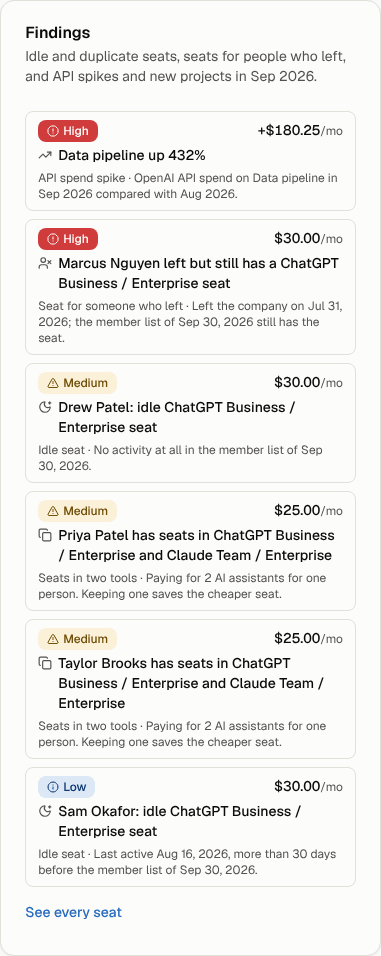
| Finding | When it shows | Worth |
|---|---|---|
| Seat for someone who left | The person is marked as left the company in People, and the latest member list still has their seat. | The seat's monthly cost. |
| Seats in two tools | One person has seats in two or more chat tools, for example ChatGPT and Claude. | The cheaper of the seats. |
| Idle seat | No activity in the 30 days before the member list's date, or no activity at all. Only when the export has a last-active column. | The seat's monthly cost. |
| API spend spike | A project or key's API spend rose more than 50% and at least 50.00 over the month before. | The increase. |
| New API project or key | A project or key has spend this month and none in any earlier month. | Its spend this month. |
API findings compare the latest month whose usage reaches the end of the month, so a month still in progress is never compared with a full one.
See every seat
Select Seats to list everyone with a seat in each tool's latest member list: the person, the tool, the cost a month, when they were last active and their status.
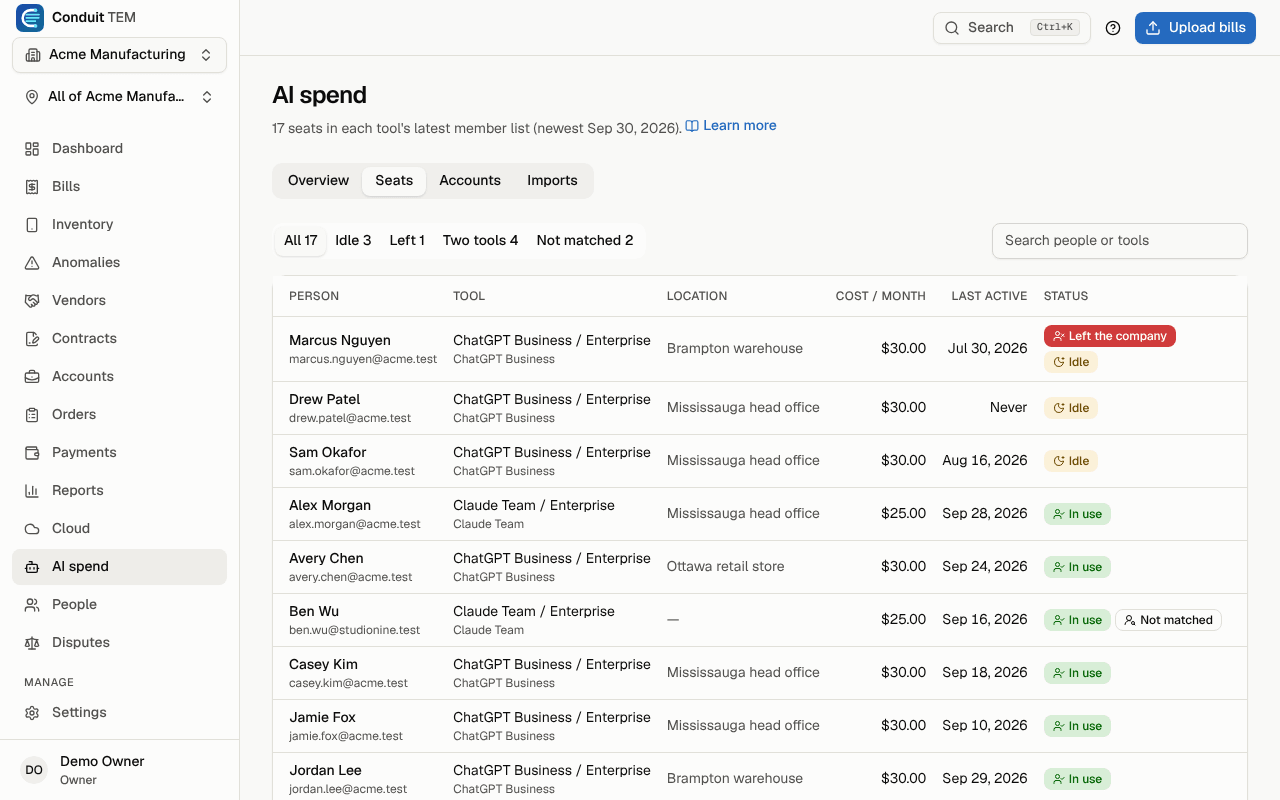
- Use the filters at the top: Idle, Left (the company), Two tools and Not matched (no one in People has that email).
- Search by name, email or tool.
- Select a matched person's name to open them in People.
Each status shows a label and an icon: Left the company, Idle, Two tools, In use, Activity unknown (the export has no last-active column) and Not matched.
Tip: a seat that isn't matched usually belongs to a contractor or uses a different email address. Add the person in People with that email, then import the member list again to link the seat.
Bills from AI vendors
Invoices from OpenAI, Anthropic, Microsoft 365 Copilot and Google Gemini go through the bill inbox like any other bill, and their lines are recognised as AI seats or API usage. A posted bill counts on AI spend for a vendor and month that has no connected or imported data; once a connection or an import covers that month, it is used instead so nothing is counted twice. A connection also wins over an upload to the same account for the same month.