Track your requests and proposals
Follow every new line, upgrade, plan change and travel pass your people ask for, and accept or decline the proposals your account manager shares with you.
In the app:Requests & proposals Orders Dashboard Self-service portal
On this page
When someone in your organization asks for a new line, a phone upgrade, a plan change or a travel pass, from Orders, Inventory or their self-service page, your account team at Conduit picks it up. Requests & proposals shows each of those requests with where it stands, and the proposals your account manager shares with you.
Owners and admins see it, for the part of the company they can see. Employees follow their own requests on their self-service page, and managers their team's.
Open Requests & proposals
- Go to Orders.
- Select the Requests & proposals tab.

Open shows what is still under way; All adds what was completed or declined. The dashboard's Open requests card lists the latest ones and how many proposals wait for your answer.
What each status means
| Status | What it means |
|---|---|
| Received | The request arrived and your account team has it. |
| Being quoted | Your account team is pricing it with the carrier. |
| Proposal ready | Your account manager shared a proposal: download it and accept or decline it. |
| Approved | You accepted, or the request was approved; the carrier orders come next. |
| Ordered | The carrier is working on it. Order opens the order. |
| Completed | The carrier finished the work. |
| Declined | It didn't go ahead: you declined the proposal, or the request was closed. |
A disconnect or a reported problem shows on Orders and on the person's self-service page, but not here: these are requests for proposals and changes to your services.
Accept or decline a proposal
Owners and admins can answer a proposal your account manager shared.
- On the request, select Proposal to download the PDF and read it.
- Select Accept or Decline.
- To decline, you can say why under Reason (optional); it helps the next proposal fit better.
- Confirm with Accept proposal or Decline proposal.
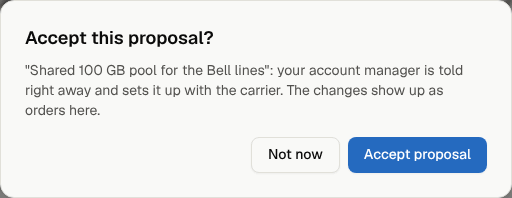
Your account manager is told right away. An accepted proposal moves to Approved, and the carrier orders that carry it out show up on Orders. A proposal can be answered once; to change your mind, contact your account manager.