Ask Conduit AI
Ask Conduit AI about your bills, lines, anomalies, contracts, spend and account in plain language, and let it prepare small changes you confirm.
On this page
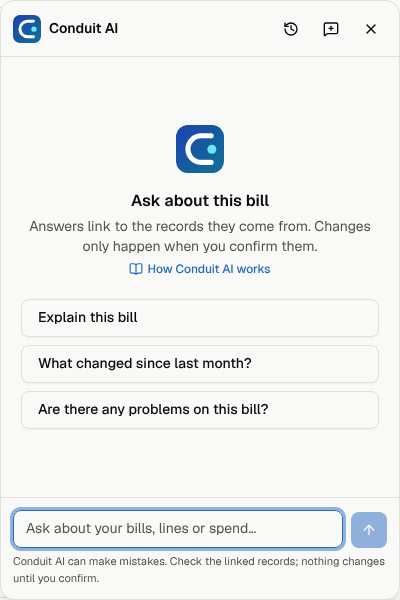
Conduit AI is in the corner of every page. Ask it how to do something in Conduit TEM, what your plan includes, or why a bill went up, and it answers in plain words with links to the bills, lines and anomalies it looked at.
Open Conduit AI
- Select the round Conduit AI button in the bottom-right corner. On a phone it sits just above the bottom bar.
- Pick one of the suggested questions, or type your own and press Enter. Use Shift+Enter for a new line.

On a computer the panel opens in the corner and stays open as you move between pages, until you close it with Esc or the ×. On a phone it fills the screen; close it to get back to the page.
The suggestions change with the page you're on. On a bill you'll see Explain this bill and What changed since last month?; on Anomalies, Which of these matter most? Conduit AI knows which bill, line or anomaly is on your screen, so "this bill" is enough.
What you can ask
| Kind of question | Examples |
|---|---|
| How to use Conduit TEM | "How do I add a location?", "What does auto-post mean?" |
| Your account | "What plan are we on?", "How many lines are we using of our limit?", "What's left to set up?" |
| Bills and spend | "Why is this month's Rogers bill higher?", "What are the biggest changes since last month?", "How much did the Toronto office spend on mobility this quarter?" |
| Lines | "Which lines haven't been used in 90 days?", "Who uses (416) 555-0142?" |
| Anomalies | "Which of these matter most?", "Explain this anomaly" |
| Contracts | "What's our contract rate vs what we were billed?", "When does the Bell agreement come up for renewal?" |
Answers start with the short version, then the detail. Every figure comes from your own records: if something isn't there, Conduit AI says so instead of guessing. Links in the answer and the small chips under it open the records it used, so you can check for yourself.
Tip: Conduit AI only sees what you can see. If your role is limited to some locations, its answers are too.
Let it prepare a change
Conduit AI can get a few small changes ready for you:
- mark an anomaly acknowledged, resolved or Not an issue, with a reason;
- start a dispute draft from an anomaly;
- flag a line for review or for cancellation (a tag and a note; nothing is cancelled with the carrier);
- set who uses a line, or move it to another location or cost centre.
It never makes the change itself. It shows a card that says exactly what will happen. Select Confirm to apply it or Cancel to leave things as they are. The change goes through the same checks as on the page itself, and appears in Settings → Activity like any other change. A suggestion that isn't confirmed within an hour expires.
Conduit AI won't delete anything, pay bills, or change people, roles or settings: it points you to the right page instead. Viewers can ask questions but don't get change cards.
Your conversations
- New conversation (the speech-bubble button) starts fresh.
- Your conversations (the clock button) lists earlier ones; open one to carry on, or delete it.
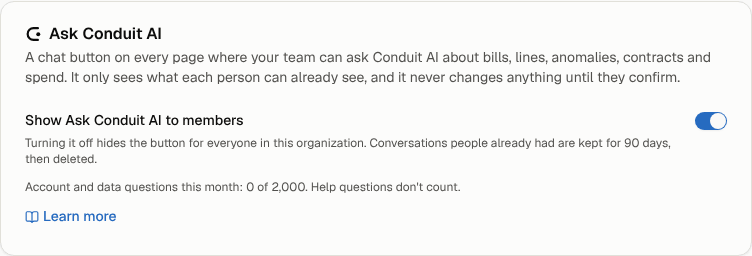
Only you can see your conversations. They're kept for 90 days after the last message, then deleted.
Plans and limits
On every plan, help questions are unlimited. Questions about your account and data are part of the paid plans, with a generous monthly allowance for fair use; the free plan includes 25 a month for the whole organization. When they're used up, Conduit AI still answers help questions and shows where to upgrade. If you ask a lot of questions in a few minutes, it asks you to wait a moment.
Turn it off
Owners and admins can hide the button for everyone under Settings → Organization → Ask Conduit AI. The same card shows how many account and data questions your organization has asked this month.
Good to know
- Conduit AI can make mistakes. Use the links to check anything important before you act on it.
- It reads bill text as information, never as instructions. If a carrier prints something odd on a bill, it may point it out.
- It sticks to Conduit TEM and your telecom, cloud and AI spend, and politely declines anything else.