Trusted senders and automatic posting
Choose which senders' bills may post by themselves, so routine bills from your carriers skip the review queue while everything else waits for a person.
In the app:Bill inbox
Anyone who learns your inbox address can send to it. That's why bills that arrive by email always wait for a person to review them, unless they come from a sender you trust. Add your carriers to an inbox's Trusted senders list and their bills can post by themselves, like uploaded bills do.
How automatic posting works
Two settings have to agree before an emailed bill posts by itself:
- Your auto-post setting. Owners and admins choose it under Settings → Organization, in Approvals and auto-post, with Post automatically when Conduit AI is confident. When it's off, no bill posts by itself, however it arrived.
- The sender is trusted. The email's sender matches the inbox's Trusted senders list.
Even then, a bill only posts by itself when Conduit AI is confident and the checks find nothing blocking. Anything unusual still waits for review. A bill from a sender who isn't on the list always waits for a person, whatever your auto-post setting.
Add trusted senders
Owners and admins can do this.
- Go to Settings → Bill inbox.
- In More inboxes, find the inbox. Every inbox has its own list, including the main one.
- In Trusted senders for (inbox name), type the addresses or domains, separated by commas. For example:
[email protected], rogers.com. - Select Save.
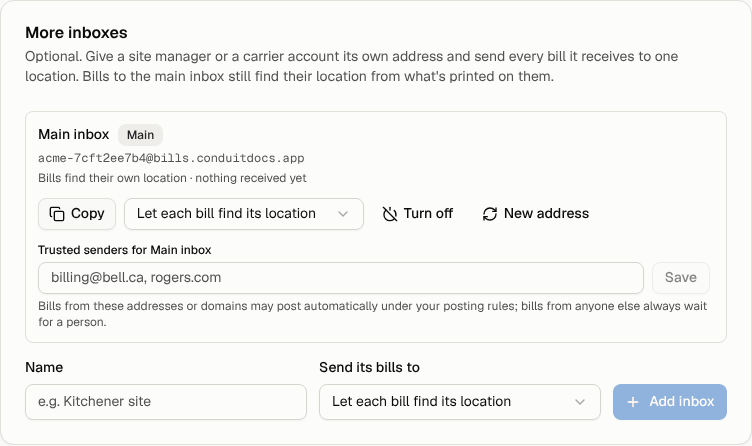
A domain such as rogers.com also covers its sub-domains, such as mail.rogers.com. An exact address such as [email protected] only matches that address. An empty list trusts nobody.
Other roles see the list as a line of text under the inbox ("Bills from … may post automatically").
Which sender is checked
The check uses the address the email came from when it reached your inbox. That isn't always the carrier:
- When the carrier emails your inbox directly (you put the inbox address in your carrier account), the sender is the carrier.
- When a mailbox forwards the email, the sender may be the carrier or your own mailbox, depending on how your mail system forwards. A "redirect" usually keeps the carrier as the sender. A "forward" often shows your mailbox instead.
To see exactly what arrives, look at Recent emails on the same page: each email shows "From" and the address. Add that address, or its domain, to the list.
Tip: Don't trust your own company domain just to make forwarding work. That would let any colleague's email post bills automatically. Trust the specific mailbox that forwards bills instead.