Set budgets and track spend against them
Set monthly telecom budgets for the company, a location, a vendor or a GL account, see a forecast for the month, and get warned before spend goes over.
In the app:Budgets
On this page
A budget is a monthly amount for part of your telecom spend. Conduit TEM tracks posted bills against it, forecasts the month from the bills still to come, and emails Finance before it goes over.
Who can do this
- Owners, admins and Finance create, edit and delete budgets.
- Everyone can see them. Members who see only part of the company see the budgets inside it, plus the company-wide ones, measured on their own part of the spend.
Budgets are part of the paid plans. If your plan doesn't include them, budgets set up earlier stay visible with their spend, but changing them and the alert emails need a paid plan. See Plans and billing.
Create a budget
- Go to Reports → Budgets.
- Select New budget.
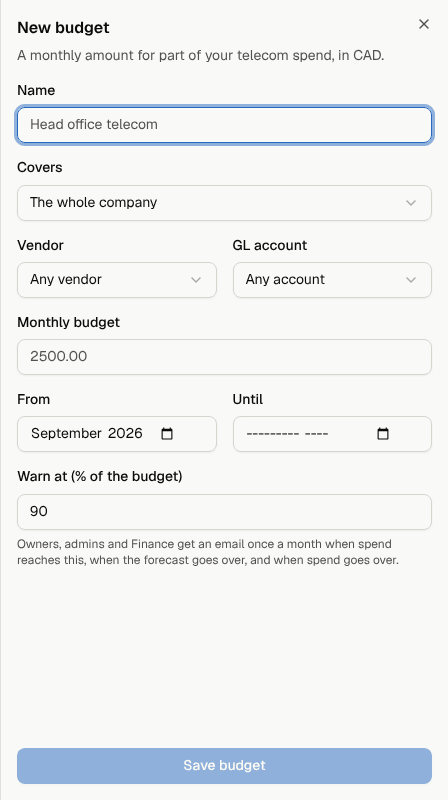
- Give it a Name, such as "Head office telecom".
- Under Covers, choose The whole company or a location, division or cost center. A unit's budget includes everything under it.
- Optionally narrow it to one Vendor and/or one GL account (see GL coding).
- Enter the Monthly budget in your organization's currency.
- Set From (the first month) and, if it should stop, Until.
- Set Warn at (% of the budget), between 50 and 100. The default is 90.
- Select Save budget.
To change a budget, select the pencil icon on it. To delete one, select the bin icon.
Read the Budgets page
Choose a month at the top. The page opens on the latest month with posted bills, and the counts beside the month picker show how many budgets are over, at risk and on track.

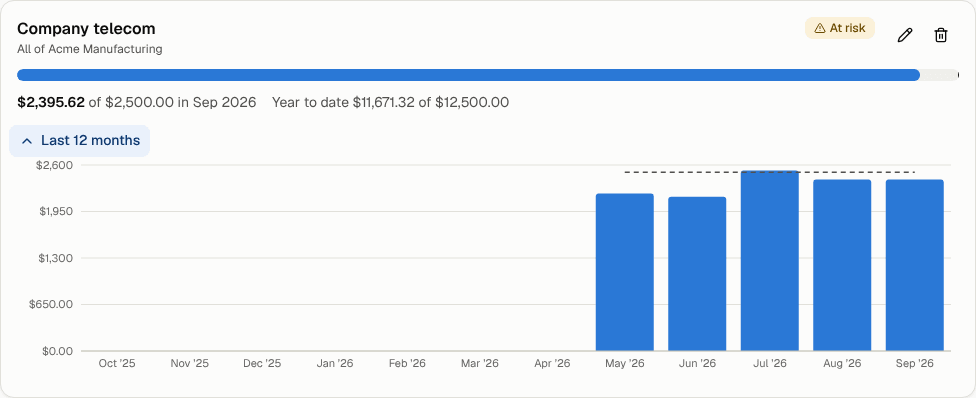
Each budget shows:
- a status badge (see below);
- a bar with what's been spent (solid), what's still expected this month (lighter), and a mark at the budget amount;
- spend for the month against the budget, and the year to date against the budget;
- for the current month, the forecast, for example "Forecast $2,610.00 with 2 accounts still to bill";
- Last 12 months: a bar chart of each month's spend against the budget line.
What the statuses mean
| Status | When |
|---|---|
| Over budget | Spend for the month is above the budget. |
| At risk | Spend has reached the warning percentage, or the forecast is above the budget. |
| On track | Neither of the above. |
| Not active this month | The month is before the budget's start or after its end. |
How spend and the forecast are worked out
- Spend is the posted bills charged to what the budget covers. Shared charges such as taxes and multi-site fees are split across locations, the same way as in reports. Bills in other currencies are left out.
- Forecast (current month only): spend so far, plus last month's amount again for every account in the budget that billed last month but hasn't posted a bill this month yet. Telecom bills arrive about once a month per account, so this is a good estimate of the month's total. For past months, the forecast is simply what was spent.
- Overlapping budgets each count in full. A "Company" budget and a "Head office" budget both include head office spend.
Bills count once they're posted, so a bill still in review doesn't show yet.
Budget alerts
Each morning, Conduit TEM emails owners, admins and Finance when a budget's current month:
- reaches its warning percentage ("Close to budget"),
- is forecast to go over ("Heading over budget"), or
- goes over ("Over budget").
Only the most serious level reached is sent, and each level goes out at most once per budget each month.
Where else budgets appear
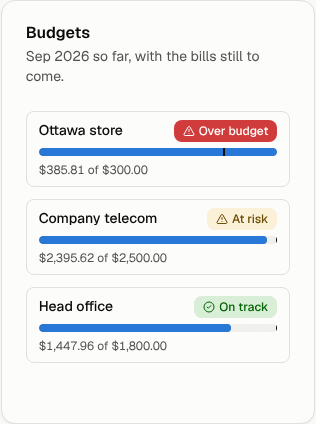
- Dashboard: a Budgets card shows each budget for the latest month with bills, worst first. Select one to open the Budgets page.
- Slide decks: decks include a Budgets section, on screen and in PowerPoint. See Slide decks.