The totals don't match
Fix a bill whose lines don't add up to its current charges or total due, so the blocking item clears and you can post it.
In the app:Bills
Before a bill can be posted, Conduit TEM checks that the charge lines Conduit AI read add up to the totals printed on the bill. When they don't, you'll see a message on the bill such as:
- "Line items sum to 296.39 before tax (334.92 with tax) but current charges are 310.00 (difference 13.61)."
- "Previous balance − payments + adjustments + current charges + taxes = …, but total due is …."
A small difference shows as a warning. A bigger one is blocking, so Post invoice stays switched off until it's fixed or dismissed.
Find the difference
- Open the bill and stay on the Summary tab.
- Look at Does it add up?. It shows Lines before tax, Tax lines, what the Bill says current charges and the Difference. A red cross means they don't match.
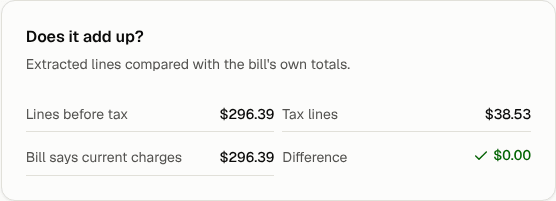
- Note the difference amount. It's often exactly one line: a charge Conduit AI missed, read twice or read with the wrong amount.
Fix the lines
- Open the Lines tab and compare it with the original bill on the left (the Document tab on a phone).
- Look first at lines marked Low confidence, and at the page any warning points to.
- Fix what you find:
- A wrong amount: change it in the Amount column.
- A missing charge: select Add line and enter it.
- A charge read twice: delete the extra one with the bin icon.
- Tax counted as a normal charge (or the other way round): change the line's Category to or from Tax.
- Go back to Summary. When the difference shows $0.00 with a green tick, the lines match.
Fix the totals
Sometimes the lines are right and a total was misread instead, for example a previous balance or payment picked up from the wrong box.
- On the Summary tab, find Invoice details.
- Correct Previous balance, Payments, Adjustments, Current charges, Taxes, Credits or Total due to match the bill.
- Select Save details.
Clear the warning
Fixing the lines or totals doesn't remove the message by itself. In the card at the top of the bill, select Fixed next to it. If you've checked and the difference is genuinely on the carrier's side (a rounding difference, say), select Dismiss instead and leave a note on the bill explaining why.
Tip: If most of the bill is wrong, select Re-extract to have Conduit AI read it again from scratch instead of fixing it line by line.