Approval by Conduit staff for managed accounts
What it means when Conduit staff can approve your bills for payment, how it's recorded, and how an owner or admin turns it on or off.
In the app:Settings
On this page
Some organizations have Conduit manage their telecom expenses with them, with our team acting as their telecom consultant. For these managed accounts, our staff can approve bills for payment as part of that work. You decide whether that's allowed.
What staff approval means
When staff approval is on, a member of the Conduit team working in your account can:
- approve a bill for payment at any approval step of your approval flow. A staff approval settles that step on its own, even a step that needs "one from each";
- approve bills if you don't use an approval flow, just as your own approvers can on the Payments page.
Bills still follow your flow. A staff approval moves a bill past the step it's waiting at, and the rest of the flow carries on as usual.
When staff approval is off, our team can't approve your bills for payment or approve them past your flow, and doesn't see those buttons.
How it's recorded
Every staff decision appears in Settings → Activity, marked Conduit staff, so you can always see what our team approved and when.
The default
- On if Conduit manages your account with you. The setting says "On by default because Conduit manages this account with you."
- Off for everyone else. The setting says "Off by default: Conduit doesn't manage this account."
Whether your account is managed is something you agree with our team. If you're not sure, ask your Conduit contact.
Turn staff approval on or off
Owners and admins can change this.
- Go to Settings → Organization.
- In the Approvals and auto-post card, find Conduit staff can approve bills for payment.
- Turn the switch on or off.
- Select Save rules.
Once you've made a choice, the card says "Set by your organization". To go back to the default, select Use the default, then Save rules.
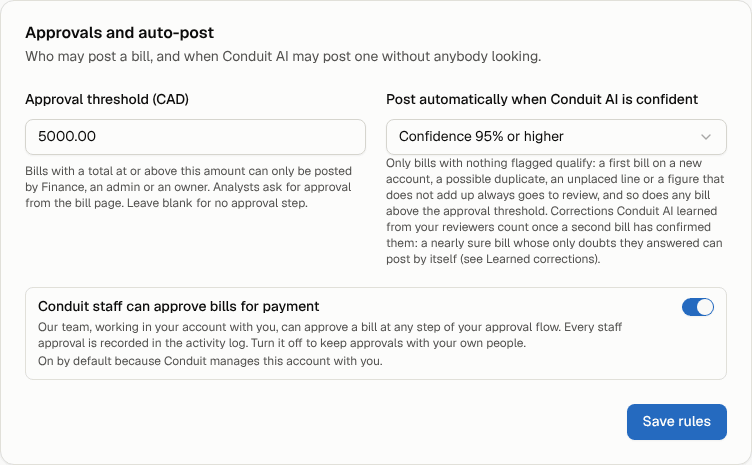
Note: This setting only covers approval for payment. The other two settings in the card, the approval threshold and auto-post, decide who can post a bill and when Conduit AI can post one on its own. See Review and post a bill.